When you start learning about Search Engine Optimization (SEO), you’ll quickly discover that it consists of three primary areas:
Table of Contents
- On-Page SEO – Refers to elements related to the content on your website.
- Off-Page SEO – Includes activities that occur outside your website and influence rankings, such as backlinks, social shares, and brand mentions.
- Technical SEO – Focuses on optimizing the technical aspects of your website to improve performance, user experience, crawlability, and search visibility.
What Is Technical SEO?
Technical SEO refers to optimizing the technical components of your website and server that contribute to site performance and user experience. These factors influence how both users and search engines interact with your website.
Traditionally, technical SEO focused on:
- Crawlability – A search engine’s ability to access and navigate your website pages.
- Indexability – A search engine’s ability to analyze and add your pages to its search index.
- Technical SEO works alongside content quality and Google’s E-E-A-T principles to improve overall search performance.
- Site architecture
- XML sitemaps
- Site speed
- Duplicate content management
- Website security
- User experience
9 Essential Technical SEO Checklist Items
Many people assume technical SEO is overly complicated, but the fundamentals are easier to understand than they seem. Use this checklist to improve your website’s technical SEO performance.
1. Use the Right SEO Tools
One of the first steps in any SEO strategy is choosing the right SEO tools. If you’re using WordPress, a reliable SEO plugin can simplify many technical SEO tasks, including sitemap creation, schema implementation, and site optimization monitoring.
2. Optimize Your Page Experience
One of the most important technical SEO priorities is improving page experience. Google’s page experience signals help determine how users interact with your website and directly influence rankings.
What Is Page Experience?
Page experience is a collection of signals Google uses to evaluate how users experience a webpage. These signals include:
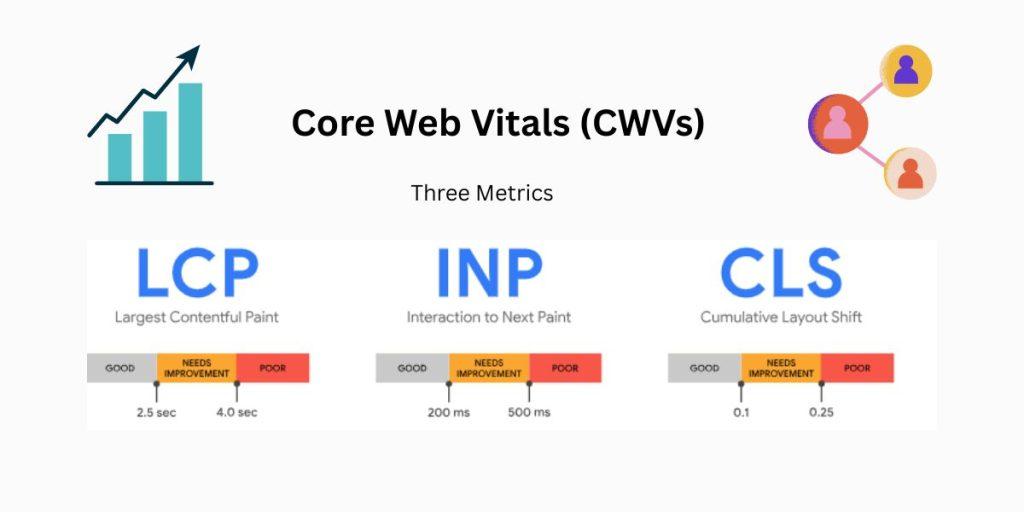
Core Web Vitals
Core Web Vitals are Google’s primary metrics for measuring page performance and user experience.
Largest Contentful Paint (LCP)
LCP measures page loading speed. Google recommends an LCP score of 2.5 seconds or less from the moment a page starts loading.
Interaction to Next Paint (INP)
INP measures how responsive a webpage is after a user interaction. Lower scores indicate a better user experience.
Cumulative Layout Shift (CLS)
CLS measures visual stability during page loading. Excessive movement of page elements results in poor usability. A good CLS score should be 0.1 or lower.
You can review your Core Web Vitals in Google Search Console under the Enhancements section.
Mobile Friendliness
Although mobile-first indexing has been around for years, many websites still fail to provide a fully optimized mobile experience.
Mobile devices account for over half of all web traffic, making mobile responsiveness essential for both user satisfaction and search rankings. Search engines prioritize mobile-friendly websites over those that offer poor mobile experiences.
HTTPS Security
Website security plays a major role in user trust and search performance. Google considers HTTPS a ranking signal because it provides encrypted and secure communication between users and websites.
HTTP vs. HTTPS
The difference may appear to be just one letter, but HTTPS includes encryption that protects user data. As cyber threats continue to increase, search engines prioritize directing users to secure websites.
Avoid Intrusive Interstitials
Intrusive interstitials are popups or overlays that block a significant portion of webpage content, especially on mobile devices.
Because these elements create a poor user experience, search engines may negatively evaluate websites that rely heavily on disruptive popups.
Remember: user satisfaction remains a top priority for search engines.
3. Check for Crawl Errors
Search engines crawl websites by following links from page to page. This process helps them understand your site’s structure, content, and hierarchy.
That’s why identifying and fixing crawl errors is critical.
Common Crawl Errors
Broken Links
Broken links can negatively impact user experience and search performance, making regular SEO audits essential.
Redirect Chains
Redirect chains occur when one redirect leads to another, creating multiple unnecessary steps before reaching the final destination.
These chains can waste crawl budget, slow page loading times, and create crawling issues for search engines.
4. Develop an Effective Site Architecture
Site architecture refers to how pages on your website are organized, grouped, and connected.
A strong site structure helps both users and search engines find information efficiently.
Key Components of Site Architecture
- Navigation menus
- Content categorization
- URL structures
- Breadcrumb navigation
- Internal linking
Well-organized site architecture improves user experience, increases time spent on site, and helps search engines better understand your content.
5. Optimize Your Robots.txt File
A robots.txt file tells search engines which areas of your website they should or should not crawl.
Not every page needs to be indexed by search engines. Examples include:
- Admin pages
- Login pages
- Cart and checkout pages
- Internal resources
- PDF files
Optimizing your robots.txt file ensures search engines focus on your most valuable pages while reducing unnecessary crawling and server load.
6. Build and Optimize an XML Sitemap
An XML sitemap acts as a roadmap for search engines, helping them discover, crawl, and index your content more efficiently.
A properly optimized sitemap provides valuable information, including:
- Relationships between important pages
- Content update frequency
- Last modification dates
Using SEO plugins such as AIOSEO makes creating and maintaining XML sitemaps simple and effective.
7. Create Search Engine-Friendly URLs
URL structure is an often-overlooked aspect of technical SEO.
Google recommends keeping URLs as simple and descriptive as possible.
Characteristics of SEO-Friendly URLs
- Logical structure
- Easy readability
- Meaningful descriptions
- Relevant keywords
URLs should help users understand what to expect before clicking. Avoid automatically generated URLs filled with random numbers or unnecessary parameters whenever possible.
8. Eliminate Duplicate Content
Duplicate content can become a major issue for any website, particularly eCommerce stores with similar product pages.
What Is Duplicate Content?
Duplicate content refers to substantially similar content appearing on multiple URLs, either within your website or across different websites.
This can include:
- Page content
- Meta titles
- Meta descriptions
- Product descriptions
Why Duplicate Content Hurts SEO

Duplicate content creates confusion for search engines because they may struggle to determine:
- Which version should be indexed
- Which page should receive ranking authority
- Which URL should appear in search results
Search engines typically avoid displaying duplicate content in search results, making it difficult for duplicate pages to rank.
How to Fix Duplicate Content
Use 301 Redirects
Redirect duplicate pages to the original version to consolidate authority and eliminate confusion.
Implement Canonical Tags
A rel=”canonical” tag tells search engines which URL should be treated as the primary version of a page.
Remove Duplicate Pages
If duplicate pages are unnecessary, remove them and redirect users to the preferred version.
9. Implement Schema Markup
Schema markup, also known as structured data, helps search engines better understand the content and context of your webpages.
It serves as a common language between websites and search engines.
Benefits of Schema Markup
- Improves search engine understanding
- Enhances visibility in search results
- Enables rich snippets and rich results
- Increases click-through rates
- Supports entity SEO
How Schema Markup Supports Entity SEO
Entity SEO focuses on helping search engines understand concepts, people, places, brands, and topics based on context rather than keywords alone.
For example, when someone searches for “Paris,” search engines need to determine whether the user means:
- Paris, France
- Paris Hilton
- Another related entity
Schema markup provides the context needed for search engines to connect your content with relevant entities.
As a result, your website becomes more likely to appear for searches related to your industry, expertise, and brand.
Conclusion
Technical SEO forms the foundation of a successful SEO strategy. While content and backlinks remain important, search engines must first be able to crawl, understand, and properly index your website before those efforts can deliver results.
By focusing on page experience, crawlability, site architecture, XML sitemaps, URL optimization, duplicate content management, and schema markup, you create a website that is easier for both users and search engines to navigate.
Technical SEO is not a one-time task but an ongoing process. Regular audits and continuous improvements will help maintain strong search visibility, improve user experience, and support long-term organic growth.